
Introduction to the use of Content Acces and LoginToboggan modules
INTRODUCTION. When you base the design of your site on the Drupal CMS, you can have many people register by themselves as users of your site.
My site, orlandocarcamo.com, is based on Drupal CMS. In that site I post information related to my job as a higher education professor, opinion articles, local news and hobbies. Around one hundred persons had registered themselves as users until I had realized that my site did not offer anything different to registered users.
Both registered and unregistered ones had access to the same information.
THE PROBLEM. I wanted to restrict the access to certain nodes and node types to registered users with the aim of leading unregistered visitors to create new accounts. When an unregistered user clicked on certain menu items, a warning should appear telling the visitor that he had no access to such a node because he was not registered as user of my site. Below that warning, a form should appear inviting the user to create an account on this site.
This task was not an easy one. I invested many hours trying many modules but they did not behave as I wanted. I tried, for example, Signup, Signup restrict by role, Simple Access and others. What all these modules do is to hide certain nodes or pages from users by roles. But what I really wanted was that the unregistered visitor saw certain link but it did not allow them access to the node but to a registration page.
THE SOLUTION. After a failed process of trying useless modules to my purpose, I found a very brief article at Web Developer’s Blog which provided the solution to my problem. There I found two modules that made the job as I wanted. The first module is Content Access; the second one is LoginToboggan.
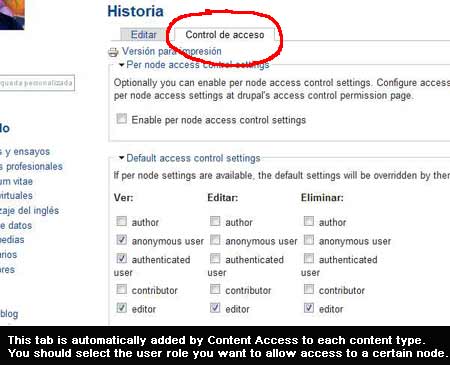
Content Access is a module that allows the site administrator to manage permissions for content types by role and author. However, this module, when working alone, poses an usability problem. Whenever an unauthorized person clicks on a restricted link, s/he is received with a rather unfriendly access denied error message with no option to become a user of your site. This problem can be avoided thanks to the LoginToboggan module.
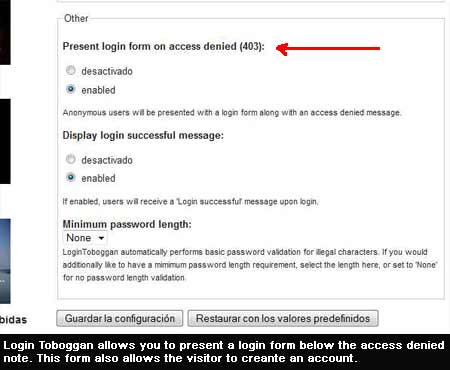
LoginToboggan allows you to display a login form on the unfriendly access denied page. By this login form unregistered users can open an account on our site and get registered. This is what I was looking for.
CONCLUSION. Having your visitors register on your site might be good enough in order to know who is visiting your site and reading your articles. You can somewhat force your visitors to register if you restrict their access to certain materials or pages. This restriction can be nicely achieved by means of the modules Content Acces and LoginToboggan working together as a team.
REFERENCES:
THE DEVELOPER’S BLOG (2008). Restrict access to Drupal nodes, node types and menu items. Online: http://webdeveloper.beforeseven.com/drupal/restrict-access-drupal-nodes-node-types-and-menu-items (Search: May 10th, 2009).
DRUPAL.ORG (2006). Login Toboggan. Online: http://drupal.org/project/logintoboggan
(Search: May 10th, 2009).
_________ (2007). Content Access. Online:
http://drupal.org/project/content_access
(Search: May 10th, 2009).

- Inicie sesión o registrese para enviar comentarios